How to Use TikVid: Your Ultimate Guide to Clean TikTok Downloads
TikTok has redefined digital entertainment, but its native download option often adds a repetitive watermark that covers parts of the screen. By using TikVid, you can unlock the ability to save original, high-definition clips that look professional and are ready for any creative project or personal archive.
As a premier choice for millions, TikVid delivers a seamless, high-speed way to grab TikTok content directly from your web browser. We prioritize your convenience by offering a completely free service that requires no software installations, no extensions, and no hidden subscriptions.
What makes TikVid the premier TikTok downloader on the market?
While there are many options like SnapTik, SaveTT, or MusicallyDown, TikVid remains the superior choice for users who value quality and efficiency. Here is why we lead the way:
- Experience lightning-fast video rendering and instant downloads without any delays.
- User-friendly design, optimized for a seamless experience across all platforms and devices.
- Completely browser-based: No software installations, browser extensions, or account registrations required.
- Your privacy is our priority: No personal data is collected or stored, ensuring complete anonymity.
- Cross-platform support: Works perfectly on Android, iOS (iPhone/iPad), Windows, macOS, and Linux.
Follow these simple steps to download TikTok videos without watermarks using TikVid:
1. Copy the Video Link
Open TikTok, select the video you want to save, hit Share, and click Copy Link.
2. Visit Our Website
Go to https://tikvid.app/en using any browser on your phone or PC.
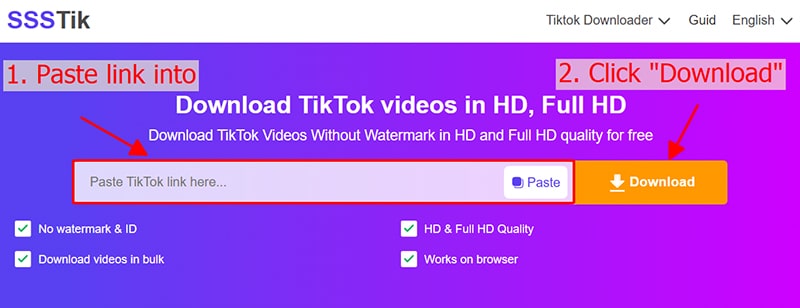
3. Paste and Analyze
Paste the link into the search box and click Download. Wait for TikVid to process the video.
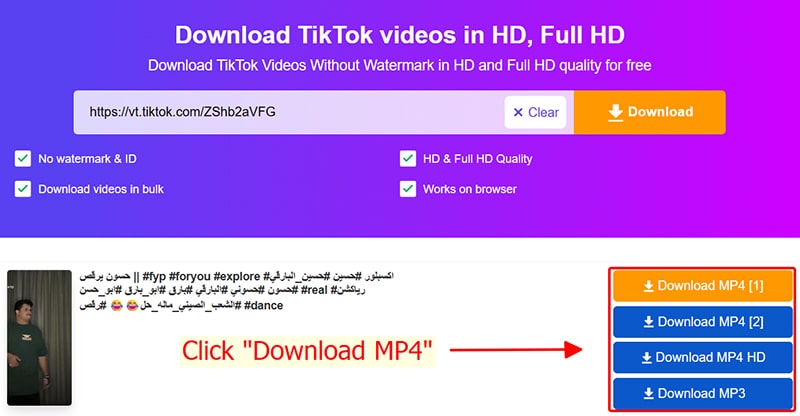
4. Download and Save
Select your preferred quality and click Download MP4 to save the video to your device.
Things to keep in mind when using TikVid
- All devices supported: Works smoothly on all platforms including Android, iOS, Windows, and macOS.
Finding your downloaded TikTok videos:
Copyright compliance
Please use downloaded content for personal purposes only. Commercial use or redistribution requires direct permission from the creator to honor their intellectual work.
Choose TikVid for the best TikTok download experience
TikVid offers a fast, high-quality, and free solution to download TikTok videos without watermarks on any device you own.